If your PC can run Minecraft,
it can host Minecraft.
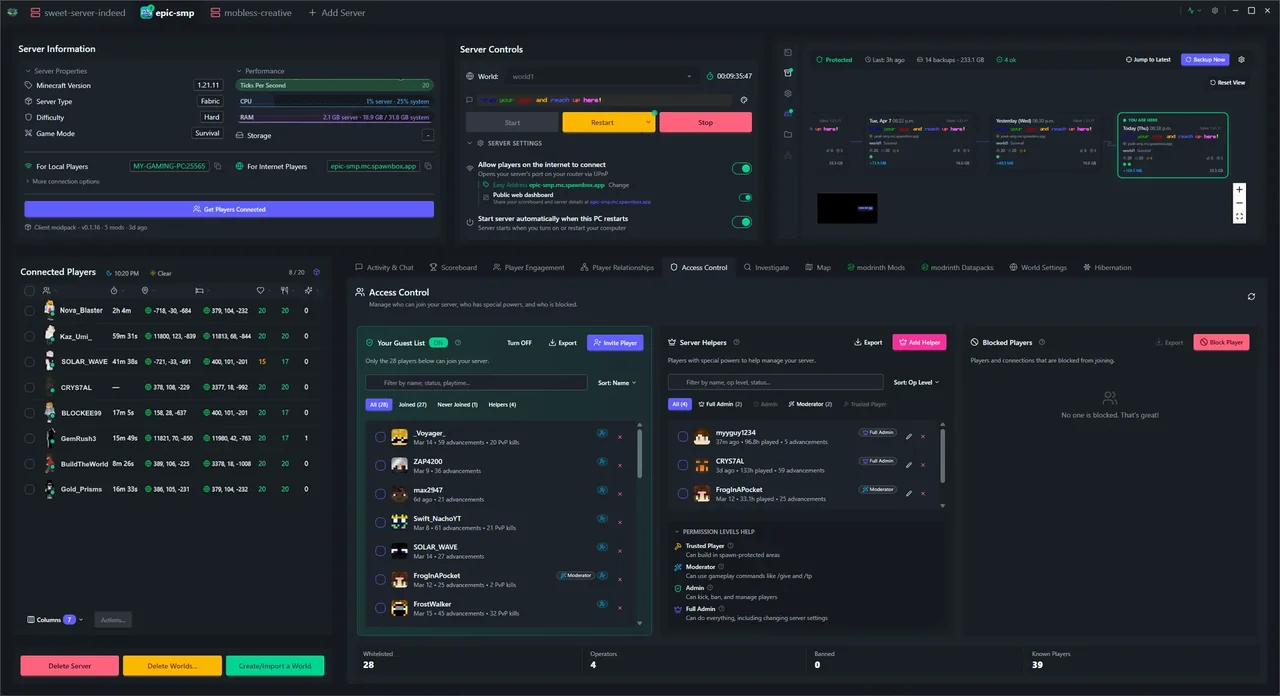
A Windows app that handles the complicated stuff for you. Built for parents, teens, and friend groups - people who want a server, not a new hobby.
“I almost did not want to start the app thinking it is too good to be true - running all that in a click.”
For Minecraft: Java Edition - Requires Windows 11 - 8GB+ RAM - SSD recommended
A note from the person who built this
My kids needed a Minecraft server
In late 2024, a health scare stopped me in my tracks. I stepped back from a long career in enterprise IT - architecting and integrating systems for some of the biggest companies in the world - and suddenly I was home with my kids while I figured out what came next. They needed a Minecraft server. How hard could it be?
The easy route didn't stay easy
So I started with a cloud hosting provider. The dashboard made it look simple - create server, share an address, done. That worked fine until my kids started asking for things the dashboard couldn't handle: a few mods, a plugin their friend's server had, a tweak to world settings, a higher player cap. Every one of those requests dropped me into raw config files and forum threads written for people who already knew what they were doing. I could muster my technical background to push through - but the whole time I was thinking about everyone who couldn't. Then their friends joined, and the social problems started: missing equipment, griefed builds, fights over who did what. The dashboard had nothing useful to tell me about any of it. It effectively forced me to learn the whole stack from scratch, just to answer questions it should have been answering for me.
Read the rest of the story
Why the whole space felt like amateur hour
Once I was down in the weeds, the whole ecosystem started to look frustrating in the same way. The docs were written for Linux engineers. A lot of the YouTube tutorials passed along recipes that even their own creators didn't always fully understand - finding what "works" isn't the same as knowing why. Nothing was designed for the people who actually run these servers - parents, teachers, teenagers, friends. After decades of architecting enterprise systems, my bar for "working software" was miles above anything this space had to offer. It all looked like amateur hour. I kept thinking: someone should fix this. And I realized that someone was probably me.
What SpawnBox actually does differently
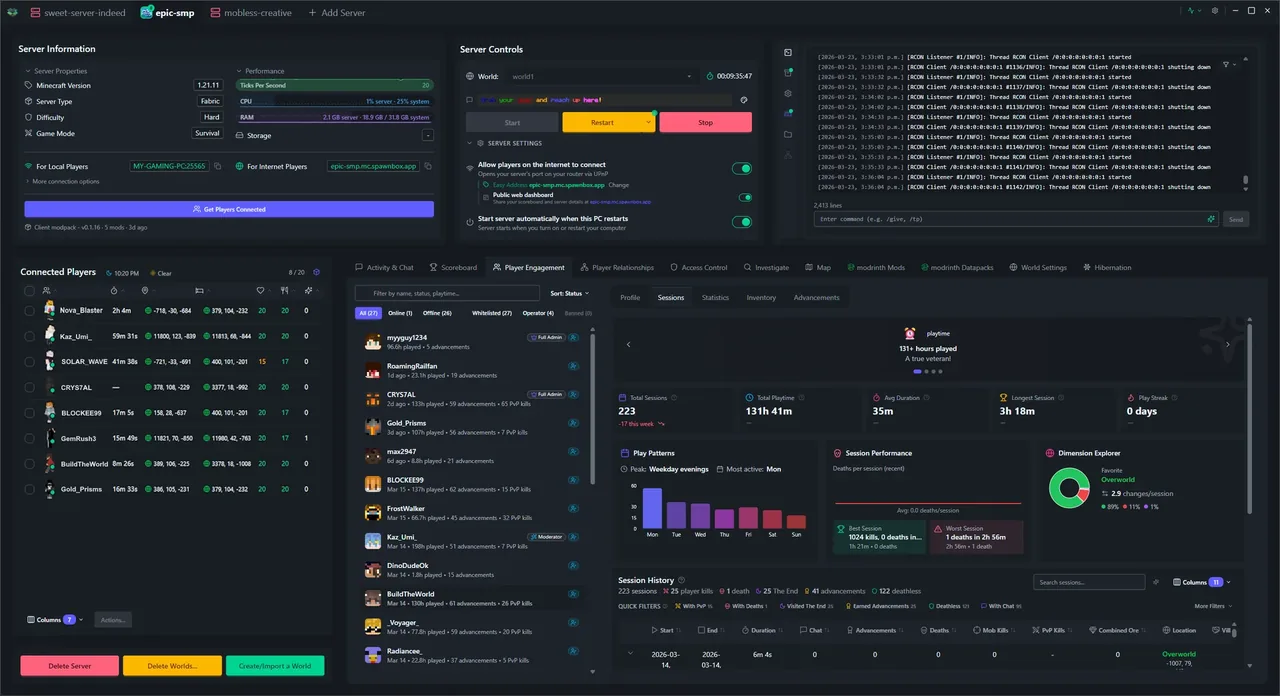
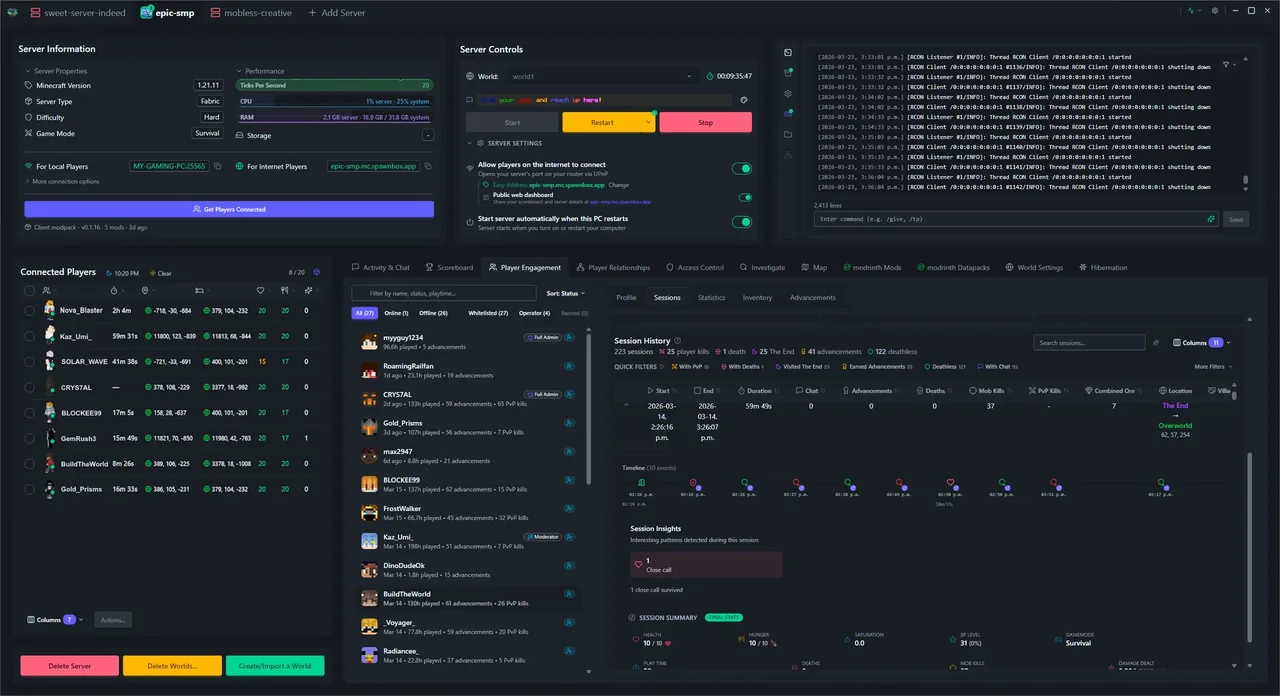
So I built SpawnBox. A single Windows app that handles everything those tutorials were trying to explain - installing the Linux parts, opening the right ports, picking mod versions that work together, keeping the server running 24/7, backing up your worlds. Pick what you want, click a button, and a few minutes later your friends are connecting. Underneath, I brought decades of experience architecting enterprise-class systems and cloud integrations - the kind of work that teaches you exactly what's required to deliver on a complicated outcome: a live world map, player profiles with session history, automatic backups, anti-cheat detection, a searchable activity log. SpawnBox is essentially enterprise-grade software built to run Minecraft servers - absurd overkill compared to anything else in the ecosystem, until you look at what actually goes into running one. At which point, enterprise-grade is exactly what it takes. And the whole point is that you don't need to know how any of it works.
Why it's out now
It's not perfect, and I'm not going to pretend it is - there are still bugs, and a long list of things I want to make better. But shipping is a feature too: I'd rather get SpawnBox into as many hands as possible now, and keep making it better with you, than polish it in private for another year. So here it is - download it, set up your server, and your friends can be connecting in a few minutes.
When something's not right, tell me. I'm the one on the other end.
Three things you never have to figure out
The stuff that makes running a Minecraft server hard? SpawnBox handles it, so you don't have to.
You don't need to know what a port is.
SpawnBox talks to your router so friends can connect from the internet. No port forwarding, no firewall rules, no IP addresses to memorize.
You don't need to figure out mod compatibility.
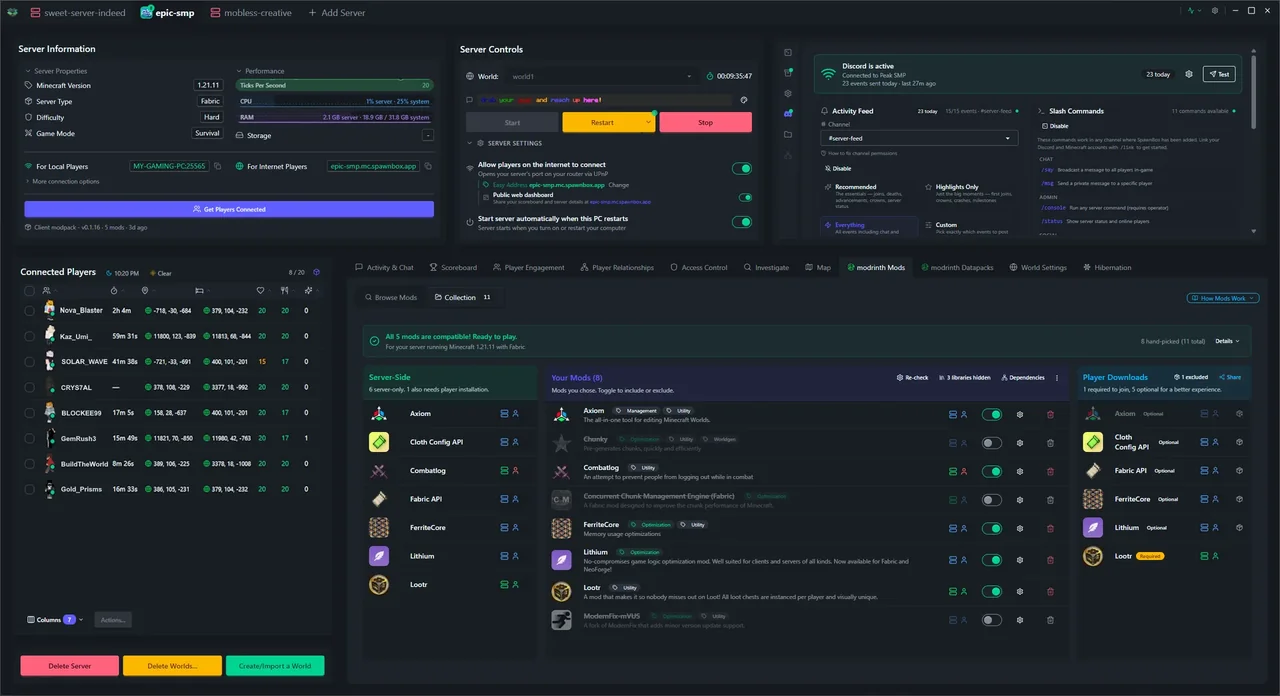
Every mod, plugin, and datapack needs a matching Minecraft version and loader. Cross-referencing them by hand across a dozen Modrinth tabs is a research grind. Pick what you want - SpawnBox's solver handles it.
You don't need to explain how to join.
SpawnBox generates a copy-paste invite with the server address and instructions. Your Discord info card updates automatically with who's online and how to connect - no chasing people down when the address changes.
The "oh no" moments
Every Minecraft admin hits these eventually. SpawnBox already has the tools to solve them.
"Your kid says their diamonds went missing."
Every player's inventory is captured on join, death, and PvP - including what's inside their ender chest. Search by item name (renamed items too, not just stock) and SpawnBox tells you exactly who has each one now.
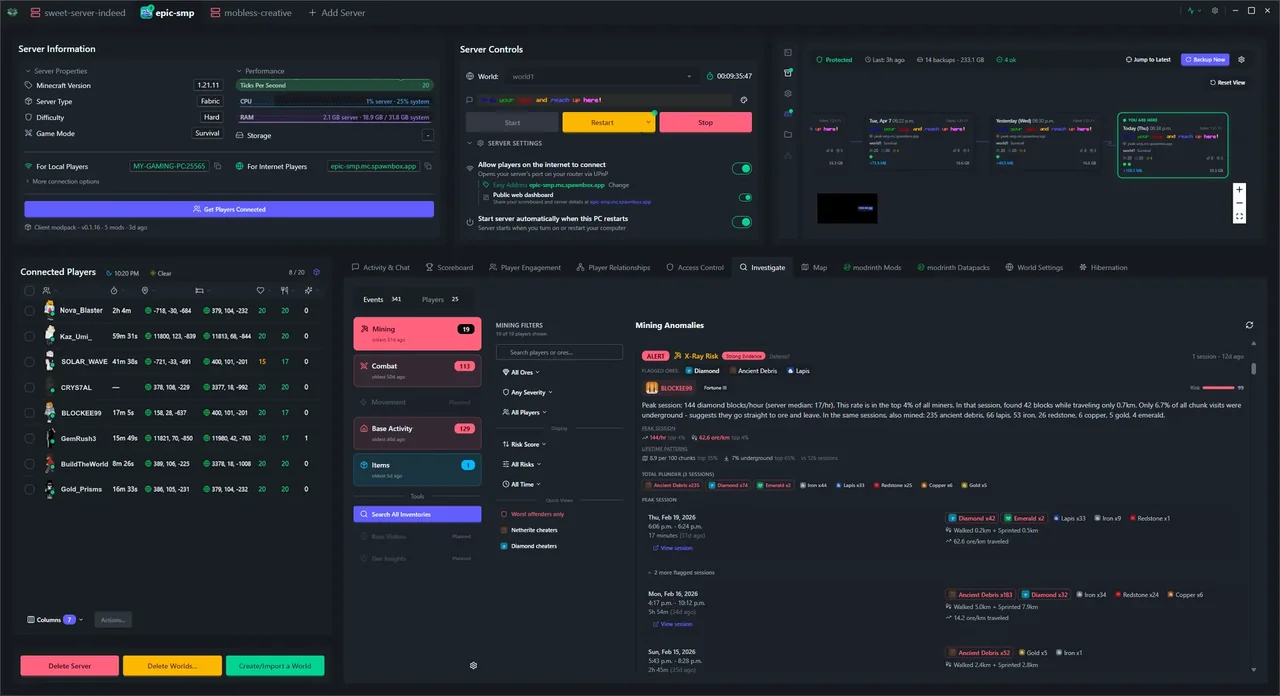
"A player is convinced someone's using x-ray."
SpawnBox analyzes mining patterns and flags suspicious ore discovery rates. You get a report showing what they mined, where they dug, and whether the numbers look natural.
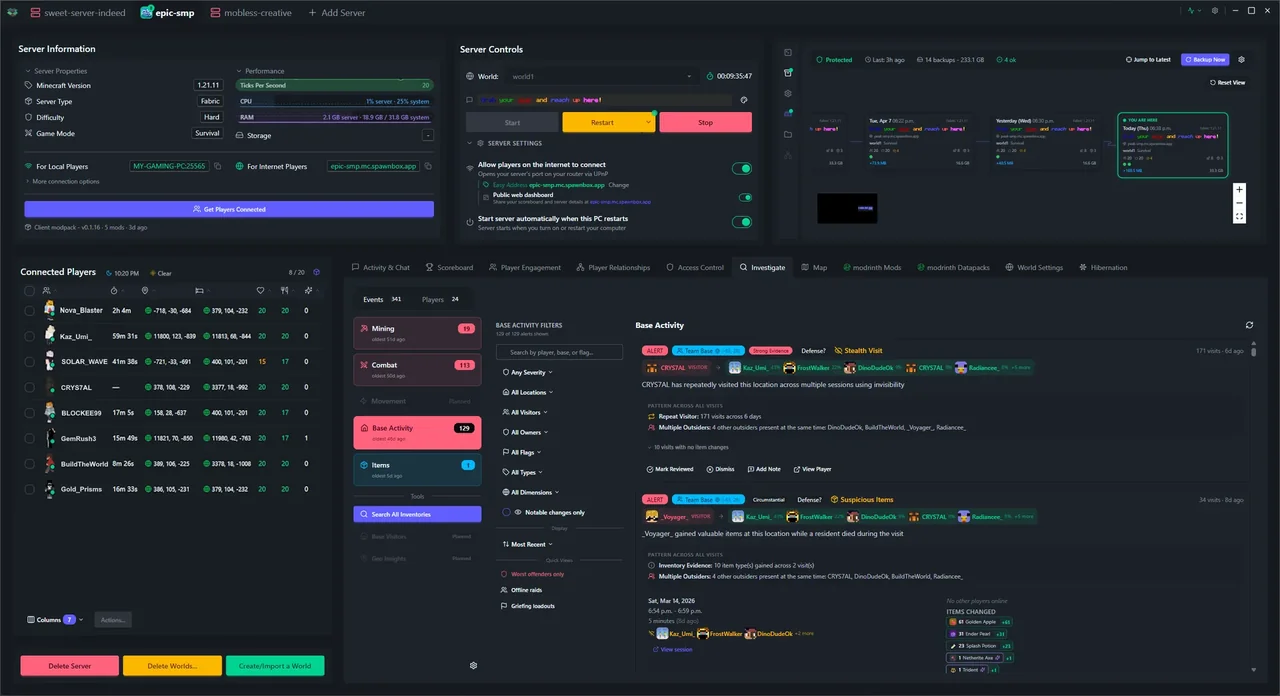
"Someone destroyed a build and nobody will fess up."
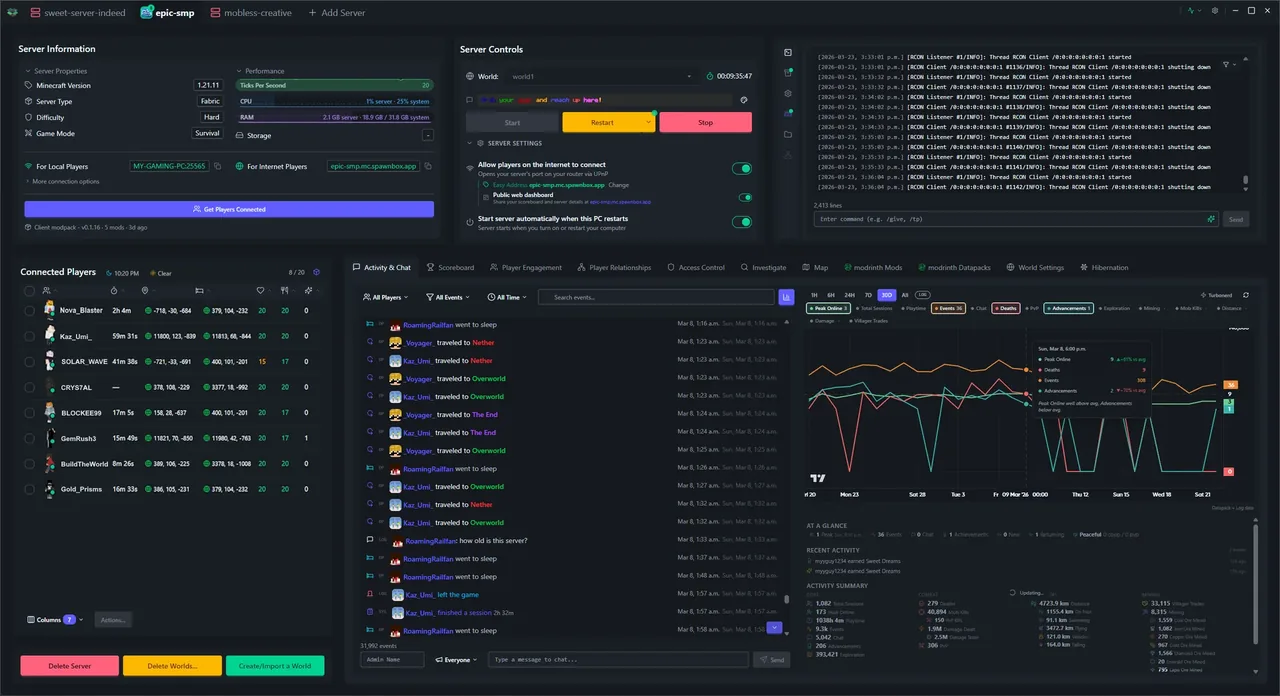
Every block break, death, and interaction flows into a searchable activity timeline. Filter by location, time, or player and see exactly what happened - by whom.
"You're at school and want to know if the server's OK."
The Discord integration tells you who's online, what's happening, and if anything's gone wrong. You can even run server commands from your phone with /console.
"The server crashes while everyone is asleep."
SpawnBox restarts it automatically within 30 seconds. If it crashes three times in a row, it stops and tells you what happened. You hear about it in the morning, not from angry Discord messages.
"A friend needs to be rescued from a lava pit."
Right-click any player in the connected list for instant admin actions - teleport, gamemode, give items, kick, ban. No commands to memorize, no /tp syntax to look up.
"Your kid says someone said something mean in chat."
Every chat message is captured as a searchable event alongside joins, deaths, and PvP. SpawnBox doesn't intercept chat in real time, but when you need to see what was said between two players at 4 PM yesterday, it's a keyword search away.
"Who actually swung first?"
Every PvP fight captures who swung first, damage dealt, and an inventory snapshot for both players. Pull up the engagement on the timeline and the evidence is on the table - who initiated, who won, and what each player was wearing when it happened.
Backups, loader switching, access control, and everything else admins run into. If you've hit it on a Minecraft server, SpawnBox probably already has an answer.
Everything your server needs
Player analytics, live maps, always-on automation, and more. The essentials are free. Paid plans add the power features.
Guided Setup Wizard
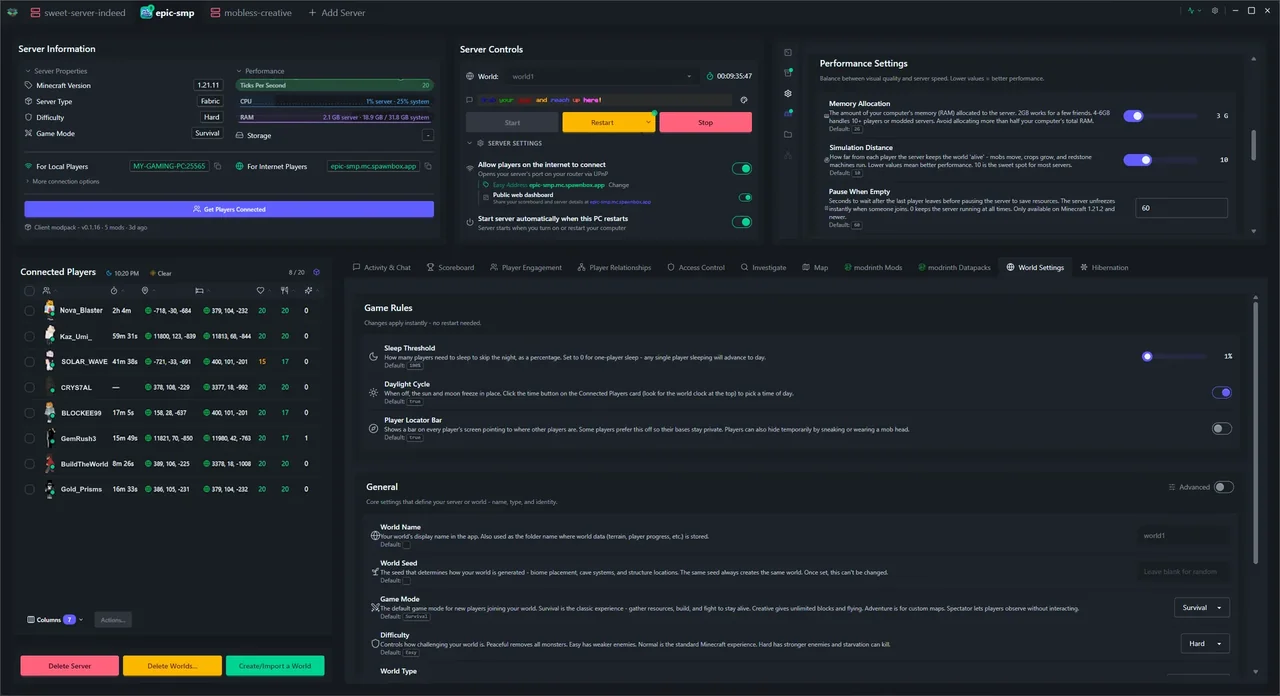
A step-by-step wizard creates each new server in about 5 minutes. Picks version, server type, mods, world settings, and access control - no command line needed.
Mods That Just Work
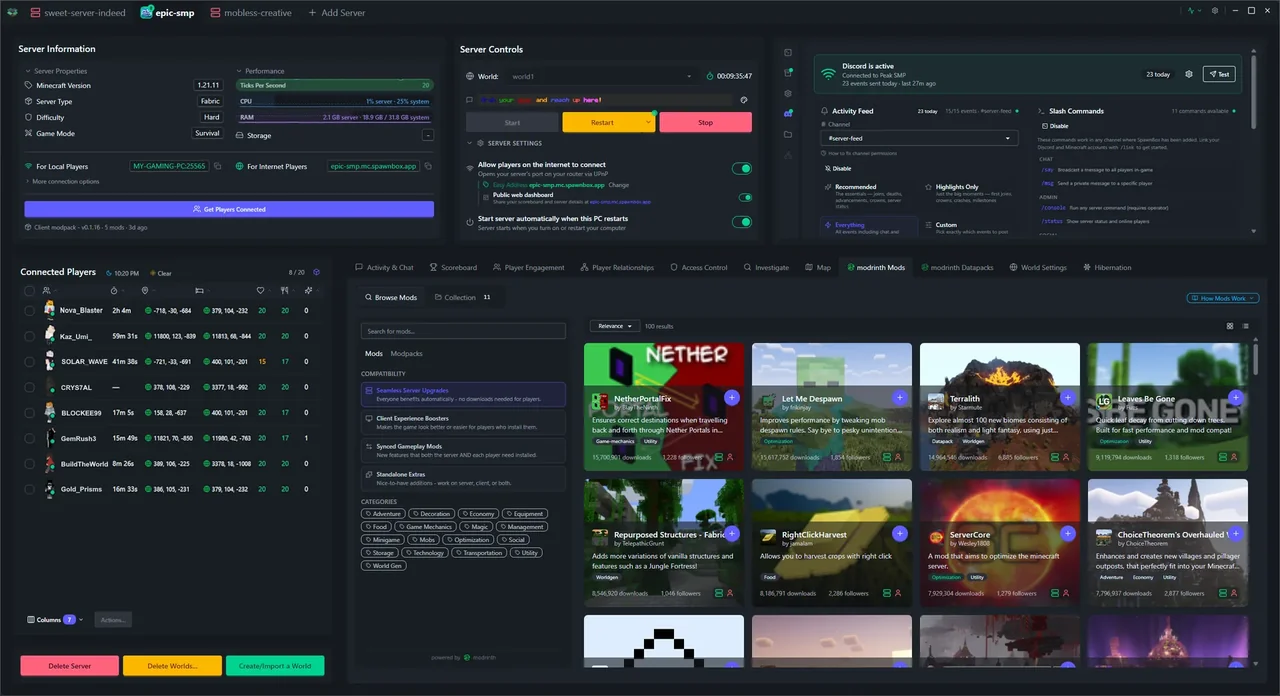
Pick the mods and plugins you want first - SpawnBox solves for which Minecraft version and loader they all work on. No other Minecraft tool does this. You also get one-click installs from Modrinth with dependency resolution, modpack export, and all six server types: Vanilla, Paper, Fabric, Forge, NeoForge, Quilt.
Runs 24/7 Automatically
Your server keeps running even when the app is closed - and you can play on the same PC. On Plus it auto-starts on boot, comes back after Windows Updates, restarts after crashes, and runs on a restart schedule.
Automatic Backups
One-click restore for when a build goes wrong, a plugin breaks, or a player nukes the spawn. Daily backups on Free and Plus, every 15 minutes on Pro. Stored on your own hardware - your worlds never leave your PC.
Live World Map Pro
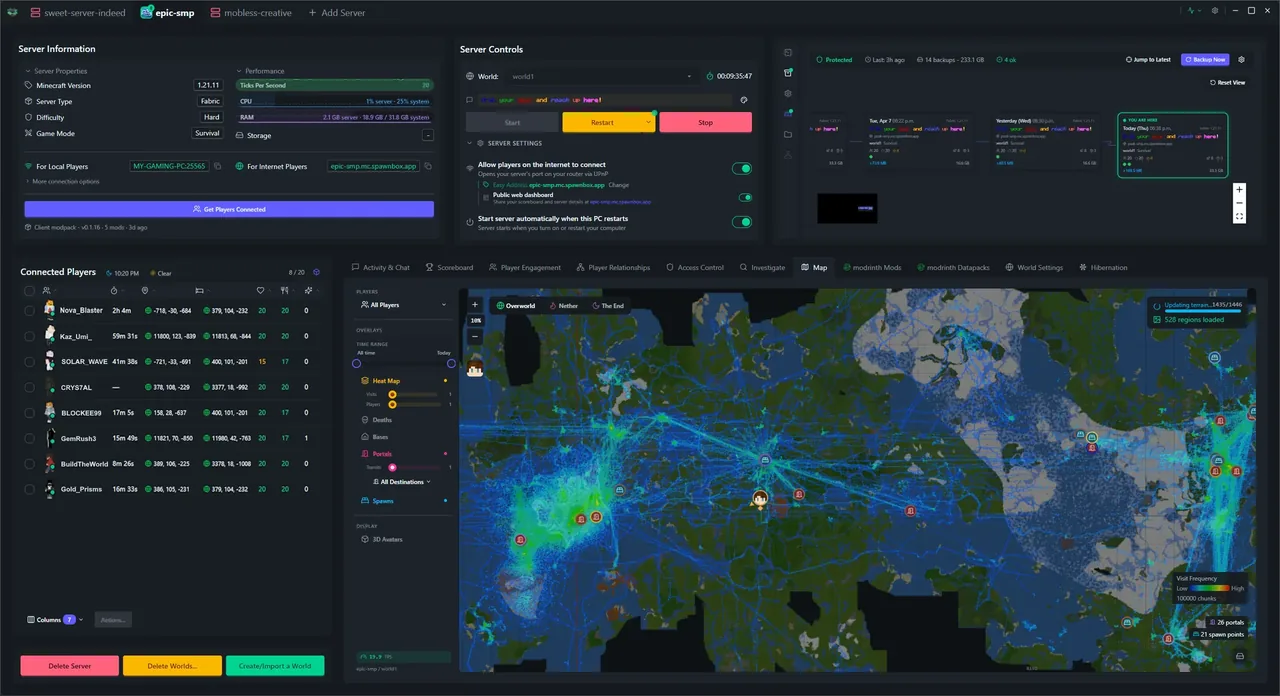
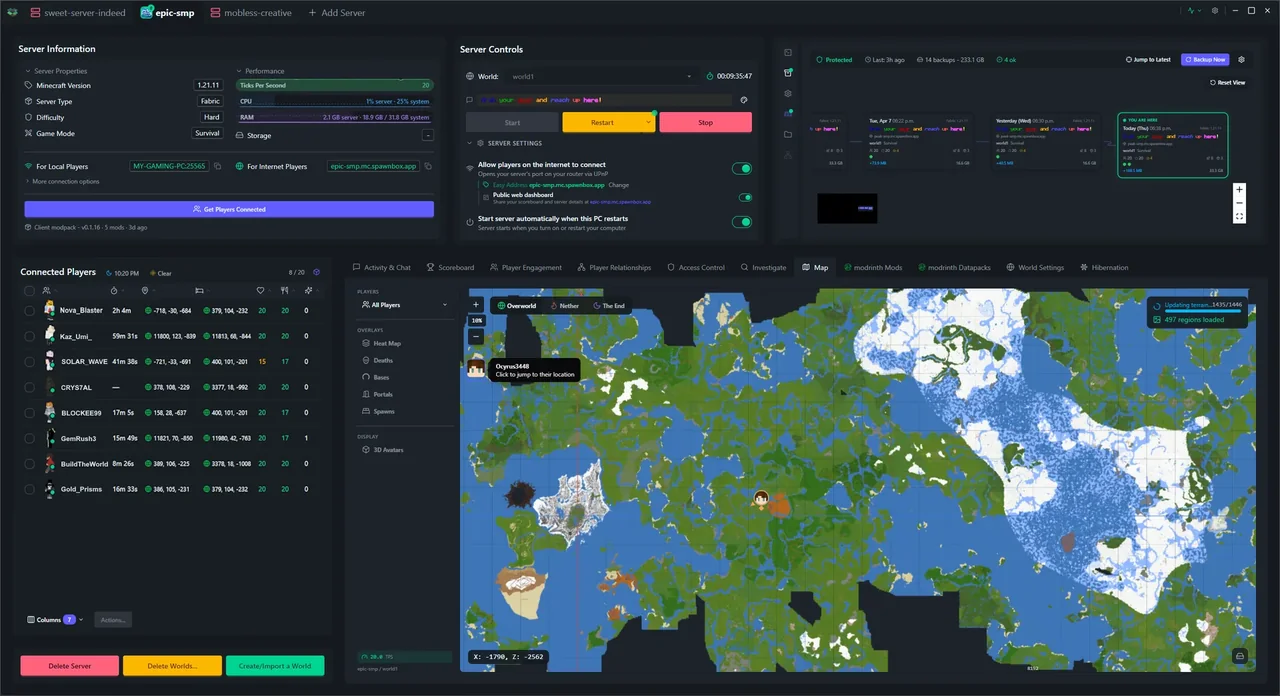
Zoomable map with real-time player positions, death markers, chunk heat maps, detected bases, area history, and Overworld/Nether/End switching. Click anywhere for full context.
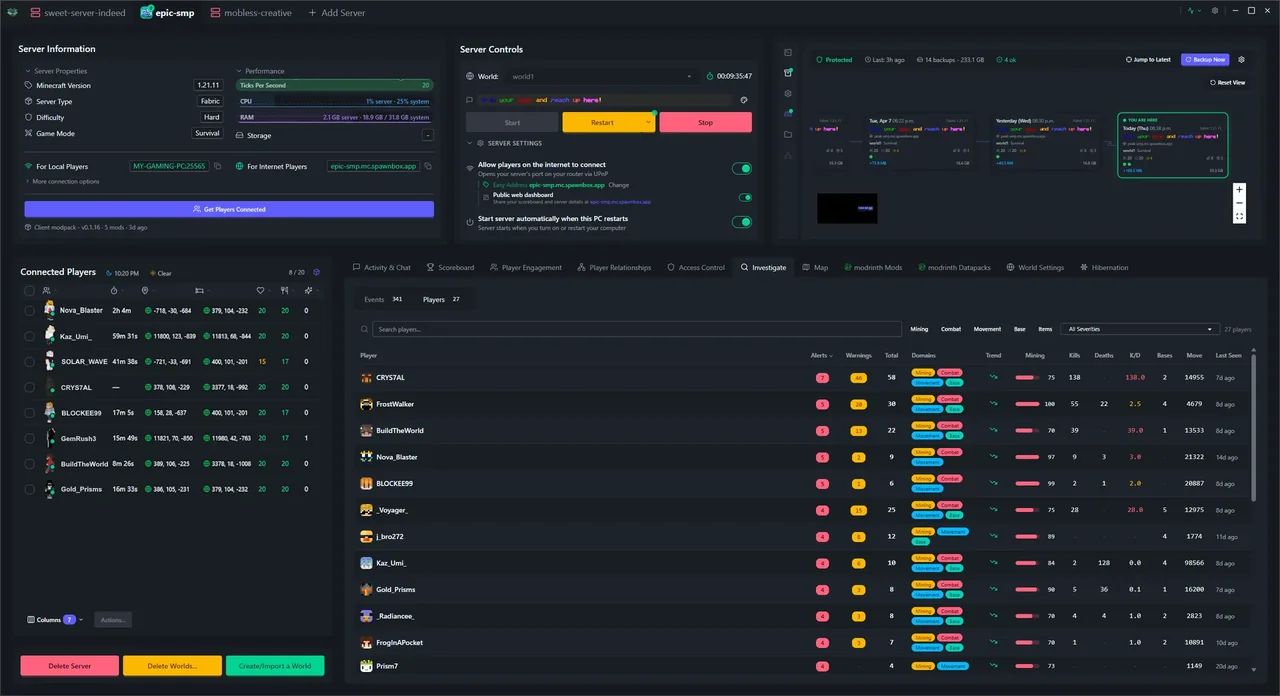
Player & Server Analytics
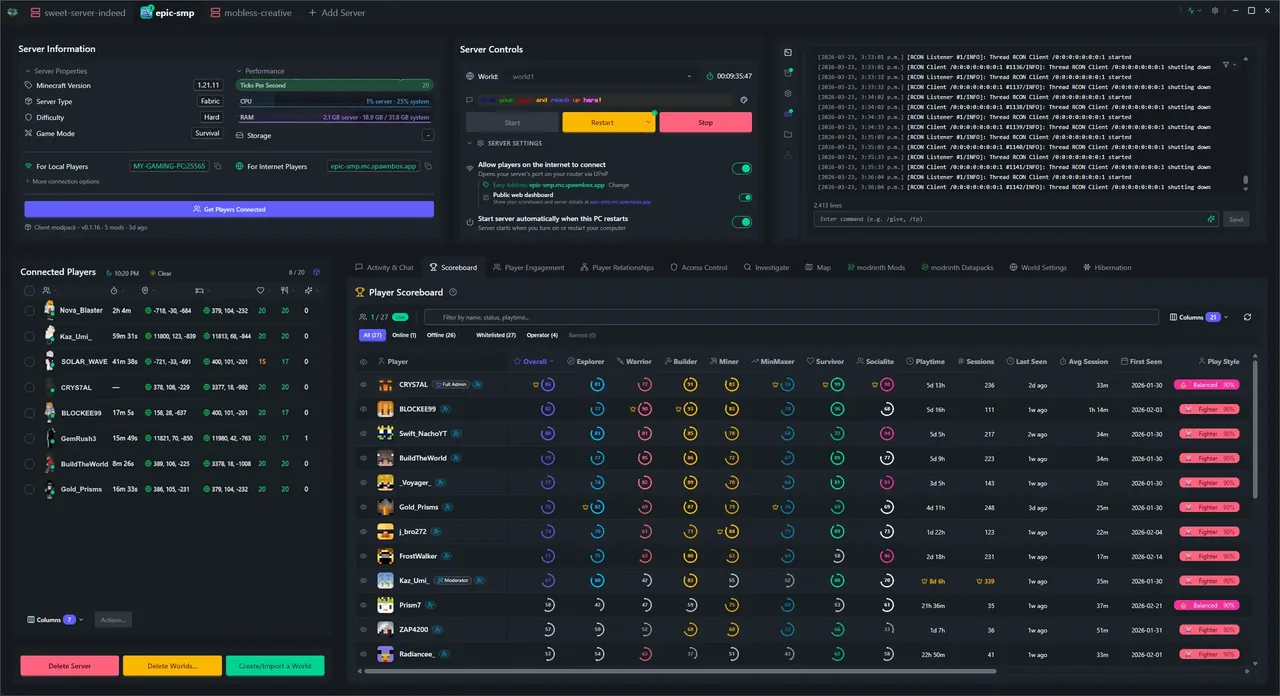
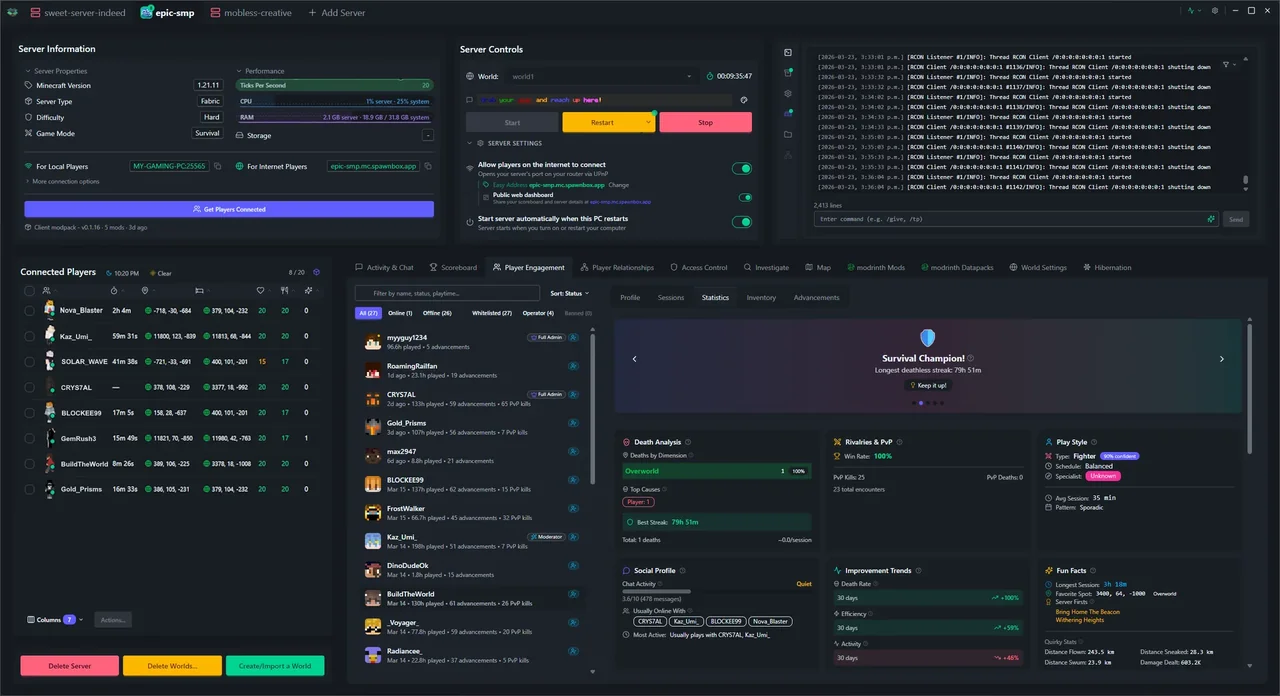
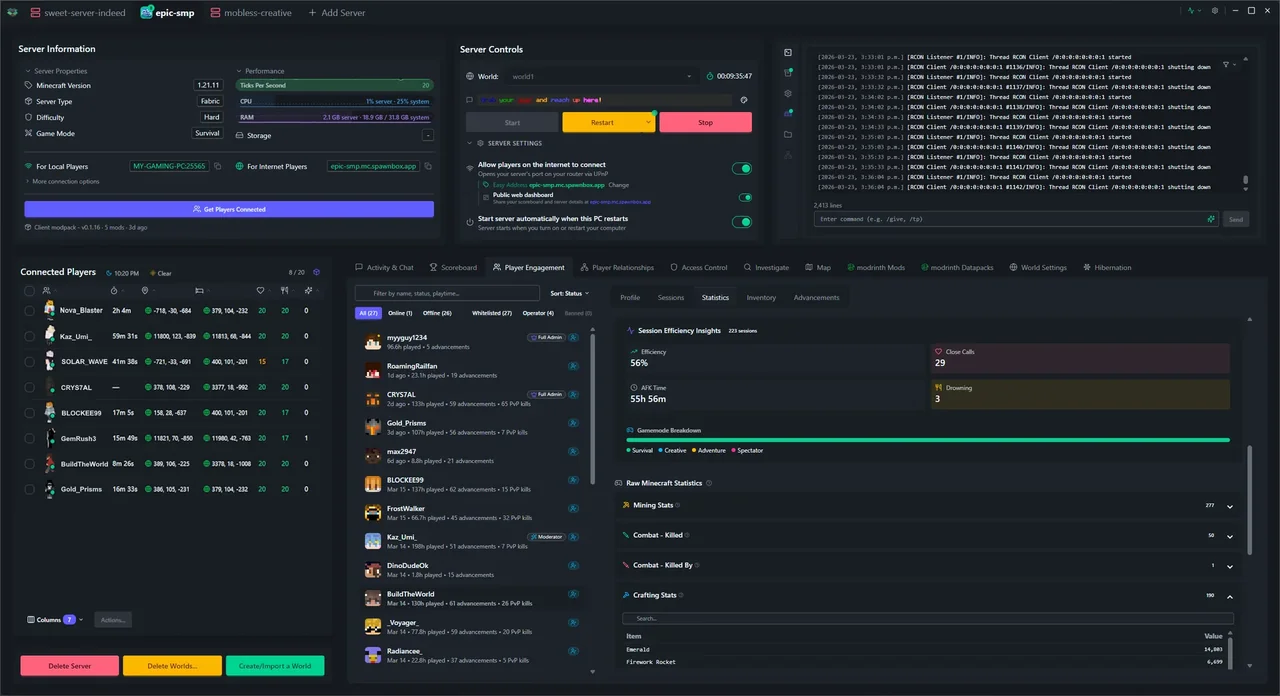
30+ metric streams charted over time - player counts, deaths, mining, combat, chat, and more, alongside sessions and player profiles with play style breakdowns. On Plus, a customizable scoreboard with a crown system, plus a public web scoreboard anyone can visit on Plus.
Discord Integration Pro
Activity feeds, live Connect Cards with scoreboard images, bidirectional chat bridge, and remote console. Deep integration that turns your Discord and Minecraft into one community.
Admin Toolkit Pro
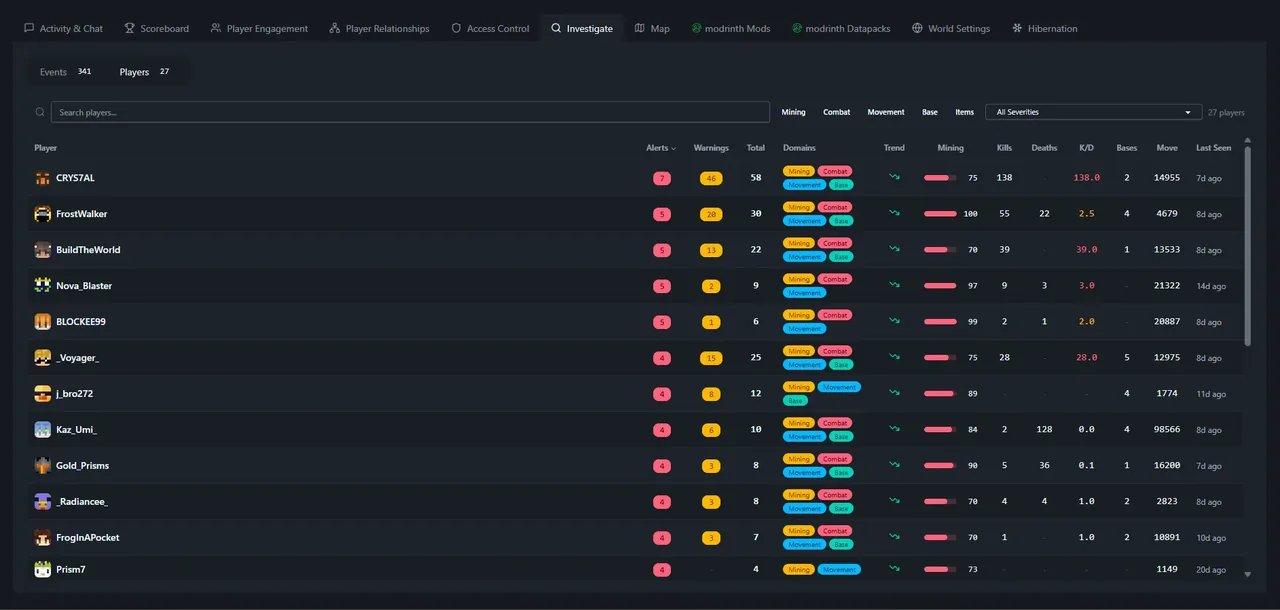
Right-click any player to teleport, kick, ban, or inspect their inventory. An investigation engine surfaces x-ray mining, griefing, spawn camping, and impossible movement. Chat is captured as searchable events - valuable for parents running family servers.
A closer look at the app
The features that separate SpawnBox from every other way to host a Minecraft server.
Pick your mods, we'll pick the server
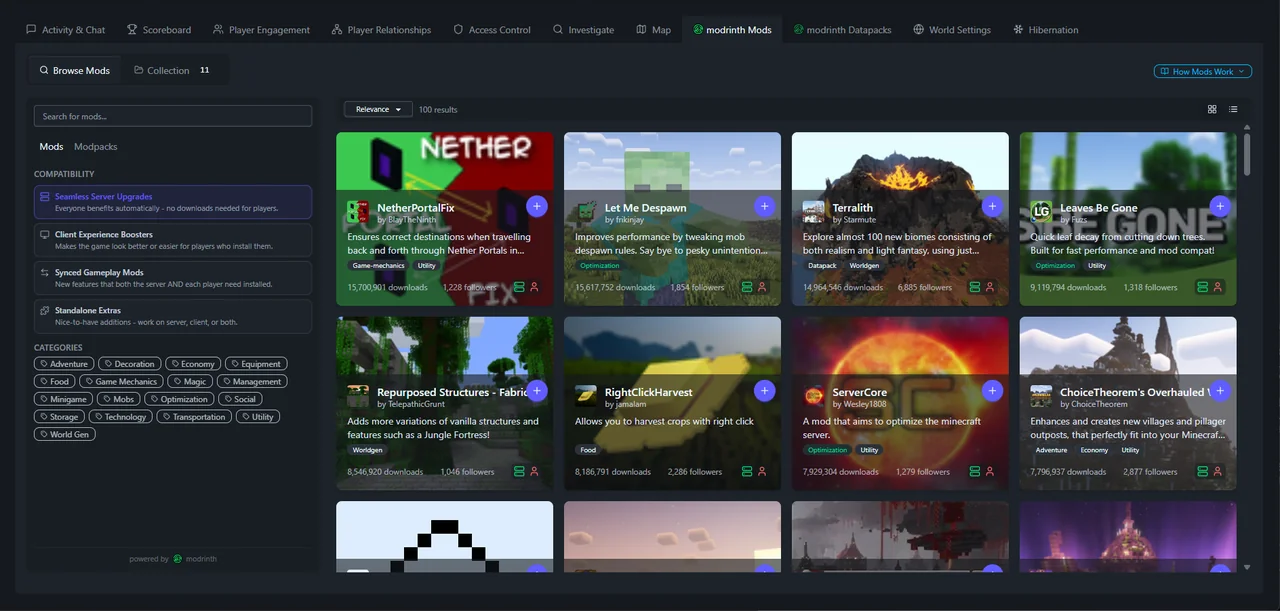
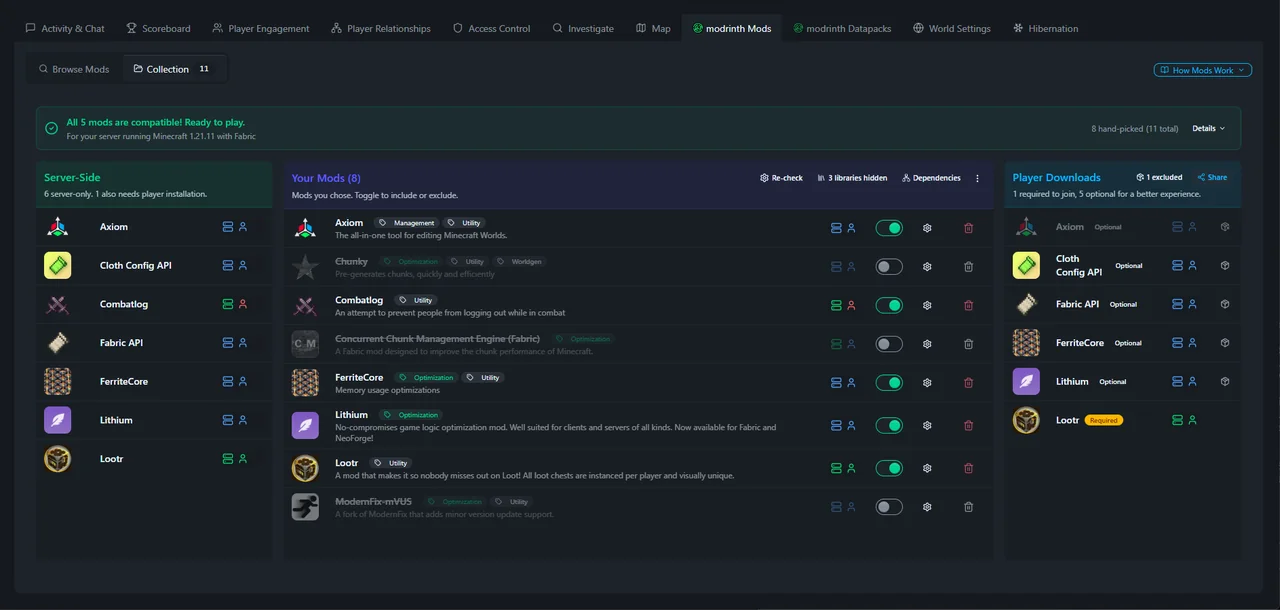
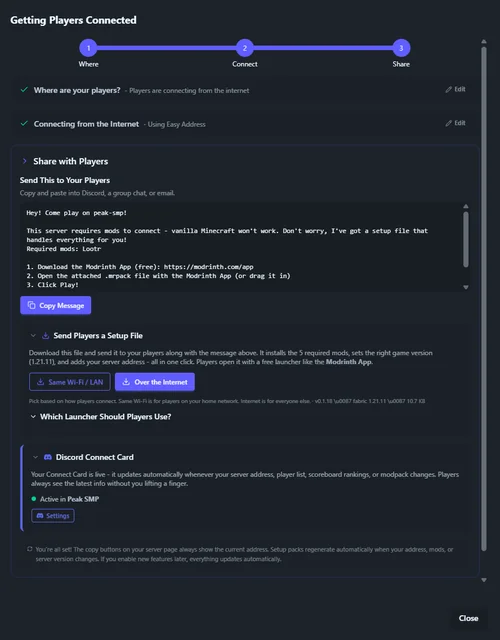
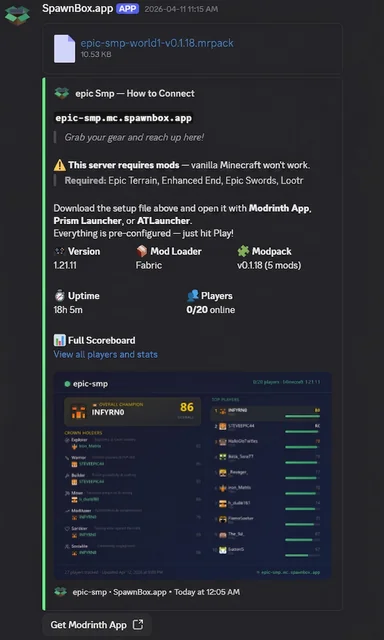
Every other tool either makes you pick a Minecraft version and loader first and then scramble for mods, plugins, and datapacks that work with it, or forces you to cross-reference every add-on across a dozen Modrinth tabs to find the most recent version and loader they all share - tedious, error-prone, and the exact kind of busywork SpawnBox exists to eliminate. Browse mods, plugins, and datapacks from Modrinth right inside the app with one-click install and automatic dependency resolution, or start with the add-ons you want and the compatibility solver figures out which Minecraft version and loader work for your whole set in one pass. The real trick comes when you invite players: SpawnBox auto-maintains the exact client modpack your friends need, and the connection wizard hands you a ready-to-paste invite with the server address, a Modrinth link, and the modpack file attached. Opening the file sets up their whole instance and drops your server straight into their Multiplayer list - no typed addresses, no hunting mod versions. The Discord bot publishes the same thing as a pinned connection card that refreshes itself every time you change mods, plugins, or datapacks.
- Browse mods, plugins, and datapacks from Modrinth with one-click install
- Pick your mods first, we solve for a compatible Minecraft version and loader
- Auto-maintained client modpack - friends double-click to join, server pre-added
- Discord connection card that refreshes itself whenever your setup changes
Your world, rendered in real time Pro
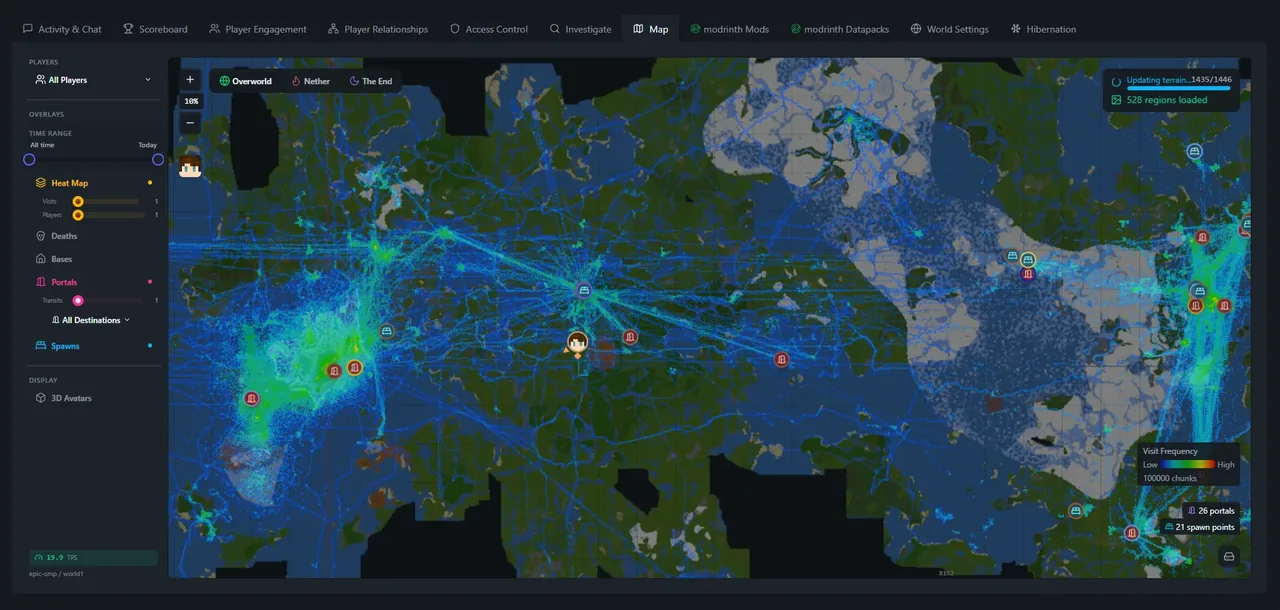
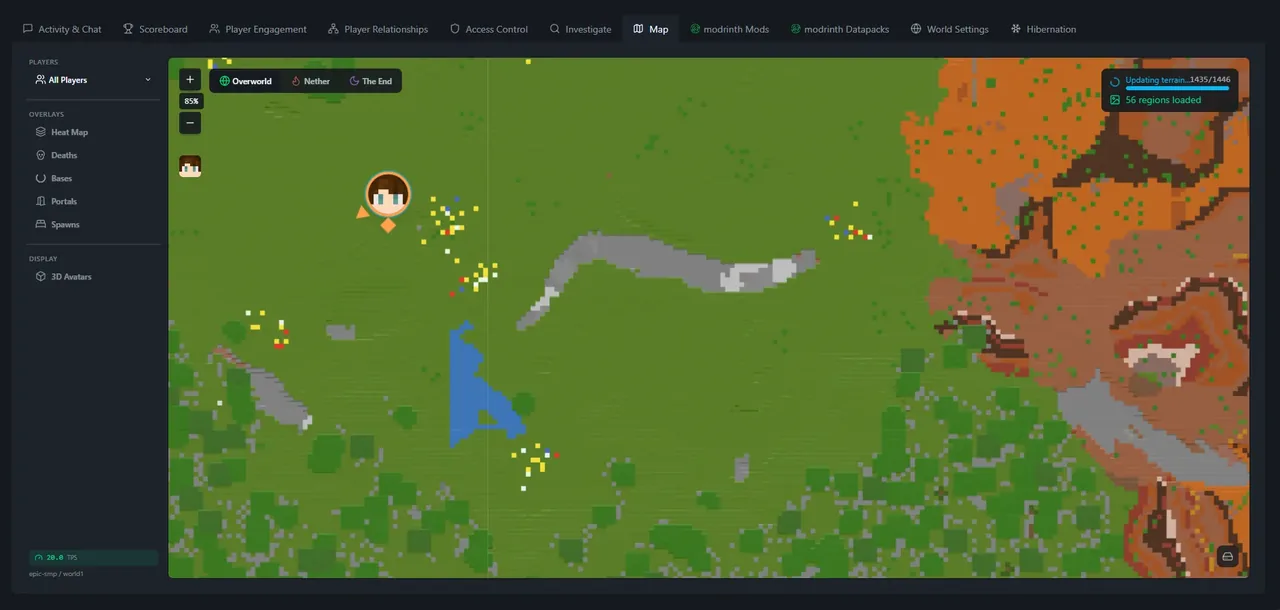
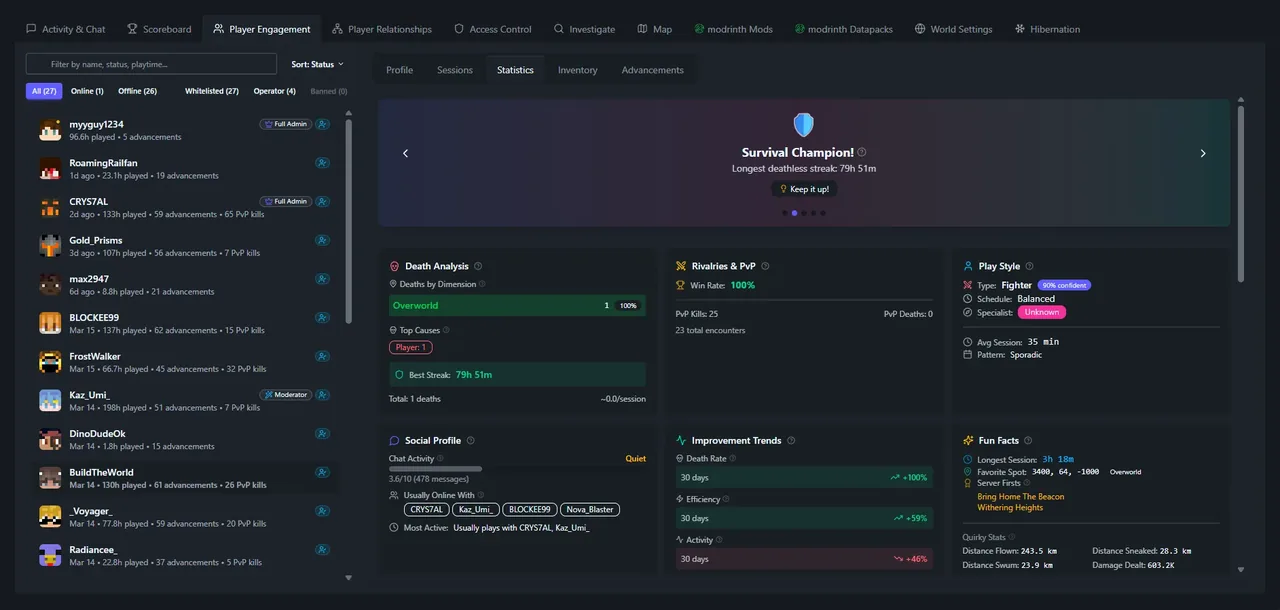
A zoomable, pannable map that updates as players explore. Death markers show where players fell, chunk heat maps reveal the busiest areas, clustering algorithms detect player bases, and clicking any spot shows its complete area history. Switch between Overworld, Nether, and End with a click.
- Real-time player tracking with health bars
- Death markers, chunk heat maps & detected bases
- Overworld, Nether & End dimension switching
- Click any spot for full area history
Know your server like never before
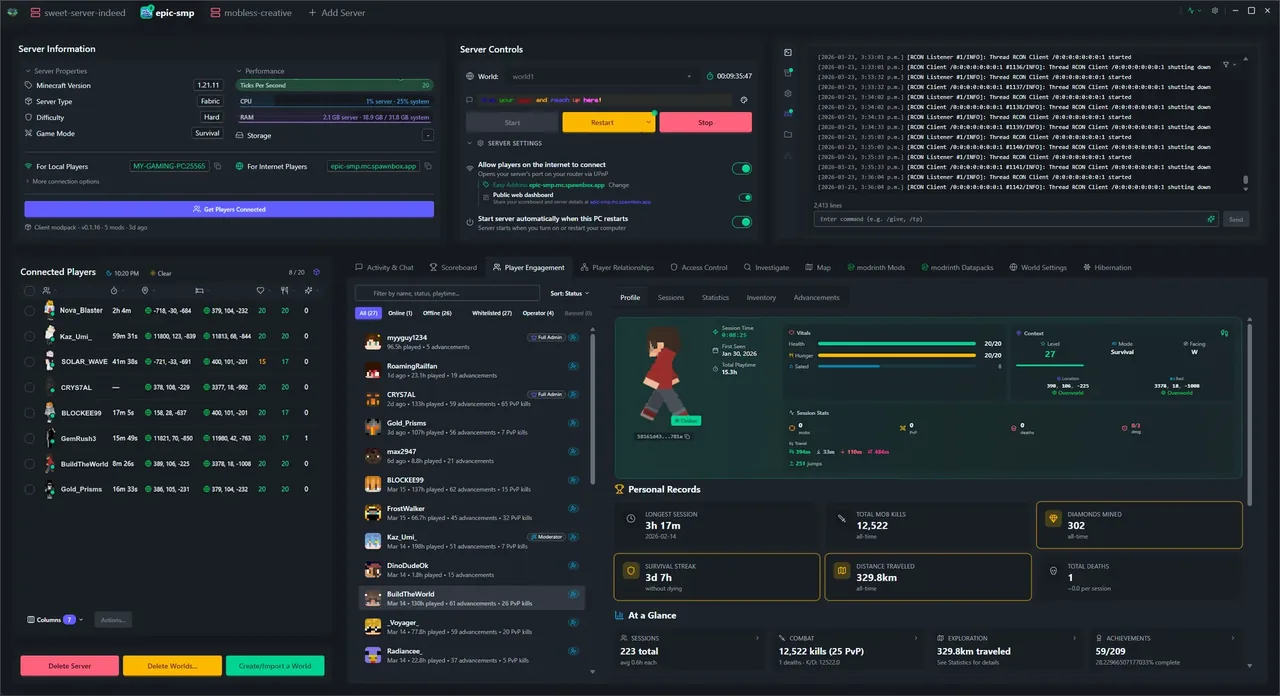
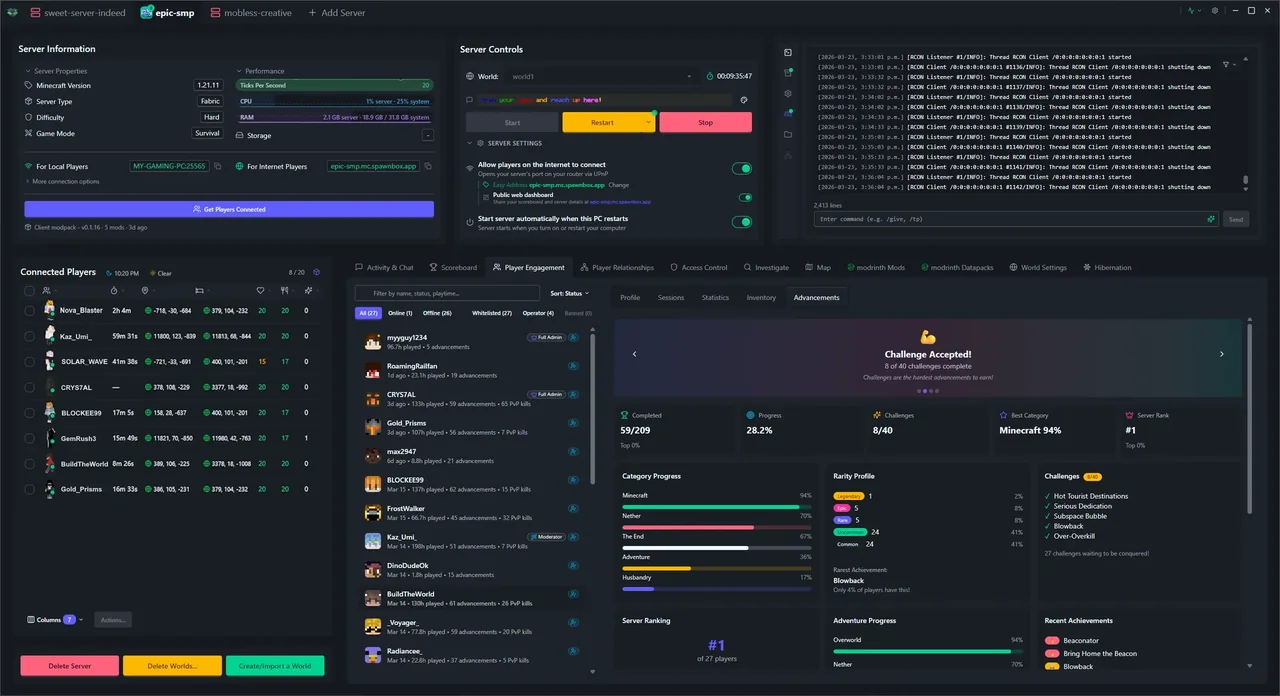
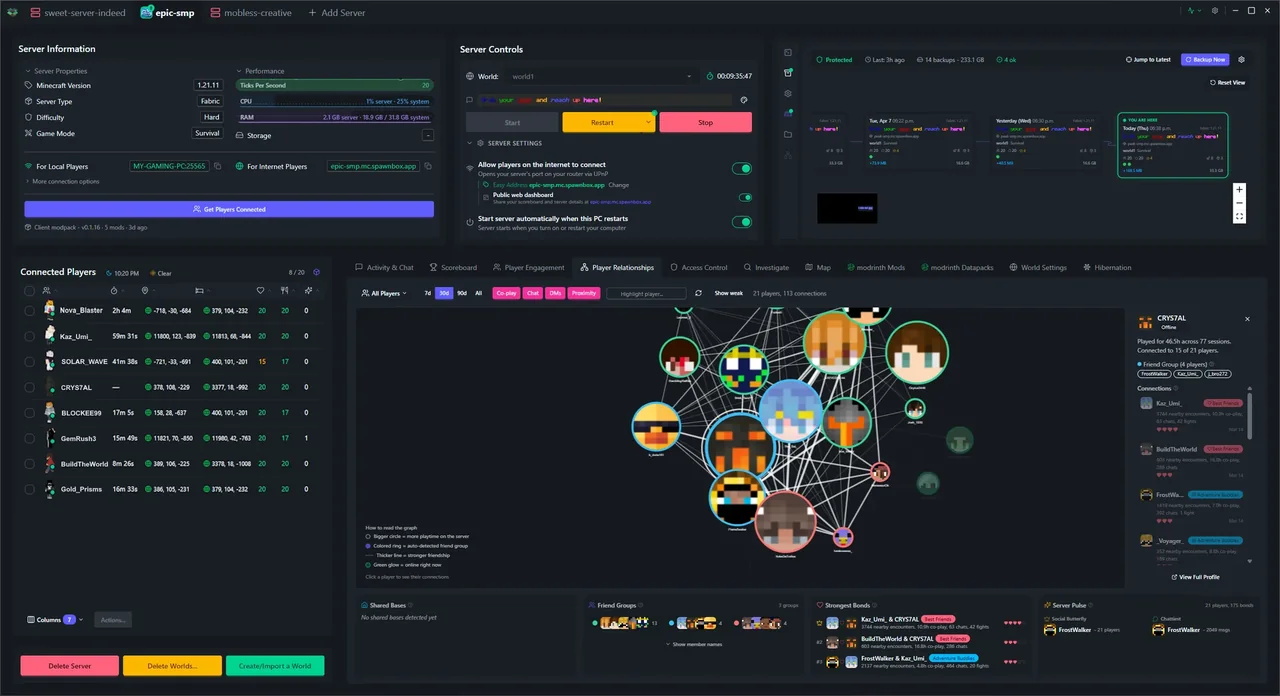
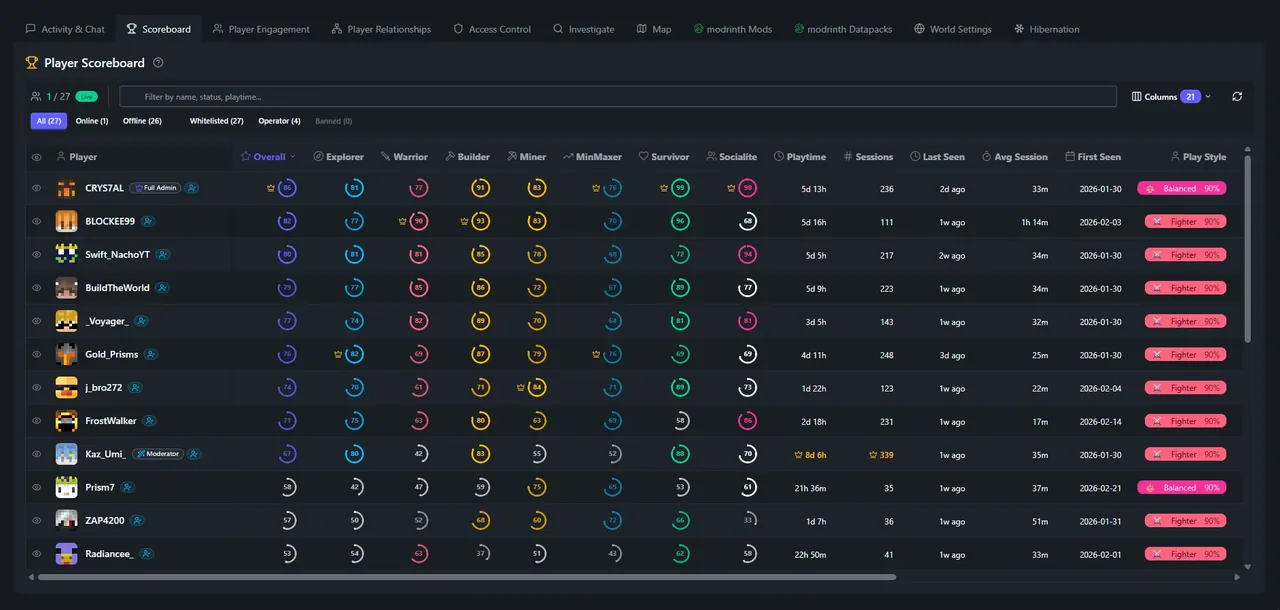
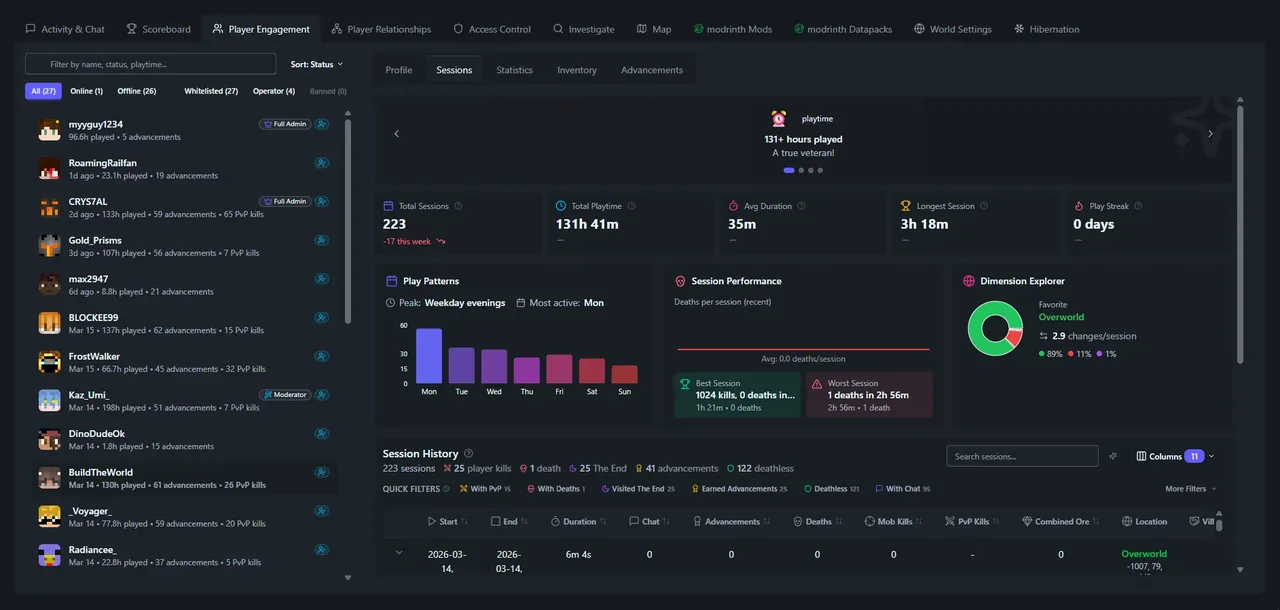
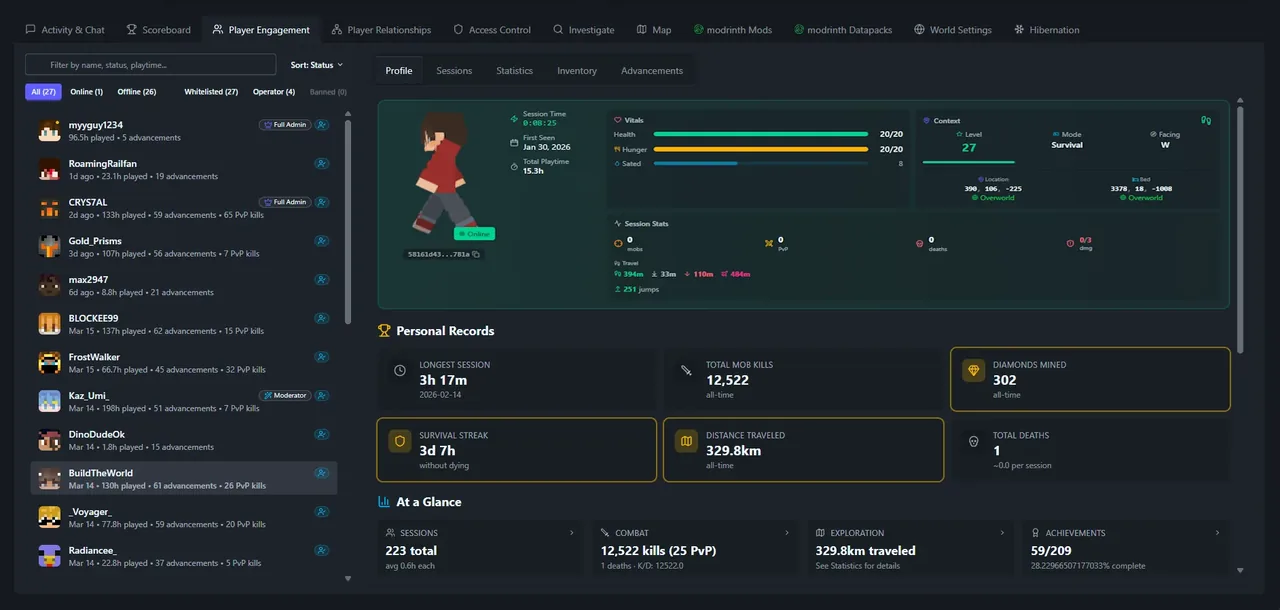
Mission Control charts 30+ metrics over time - peak concurrent players, deaths, mining output, PvP encounters, chat activity, exploration, and more. Rich player profiles track sessions, play styles, personal records, and statistics. On Plus, a customizable scoreboard ranks every player with a crown system. On Plus you also get a shareable public web scoreboard, so anyone can see your server's stats in a browser without installing anything. A social graph maps who plays together most (Pro).
- 30+ time-series metrics with interactive charts
- Player profiles with sessions, play styles & records
- Customizable all-player scoreboard with crown system Plus
- Shareable public web scoreboard Plus
- Social graph - who plays with whom Pro
See inside every inventory Pro
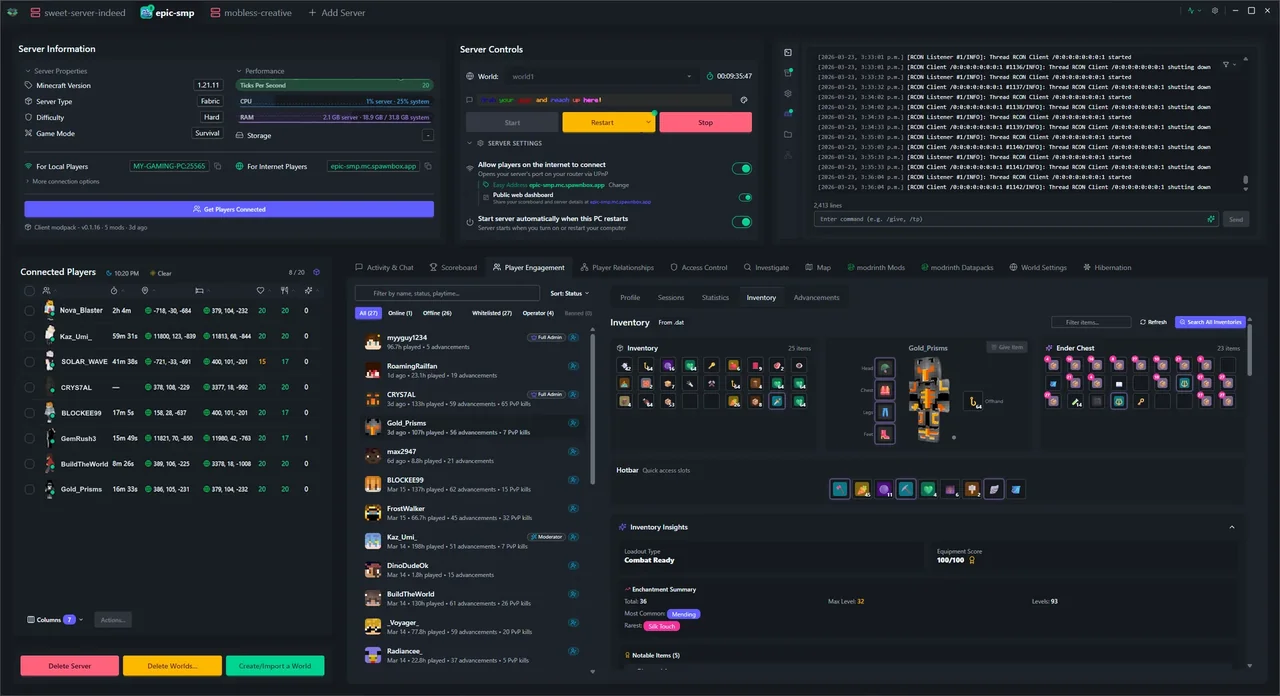
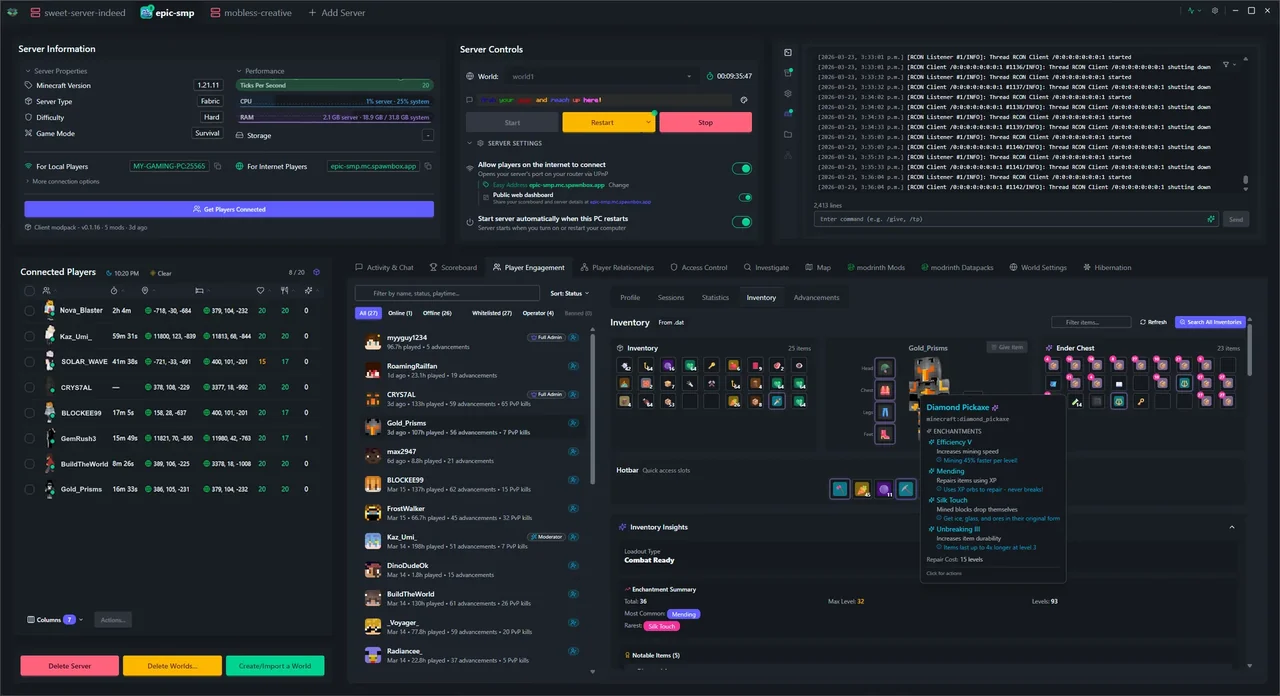
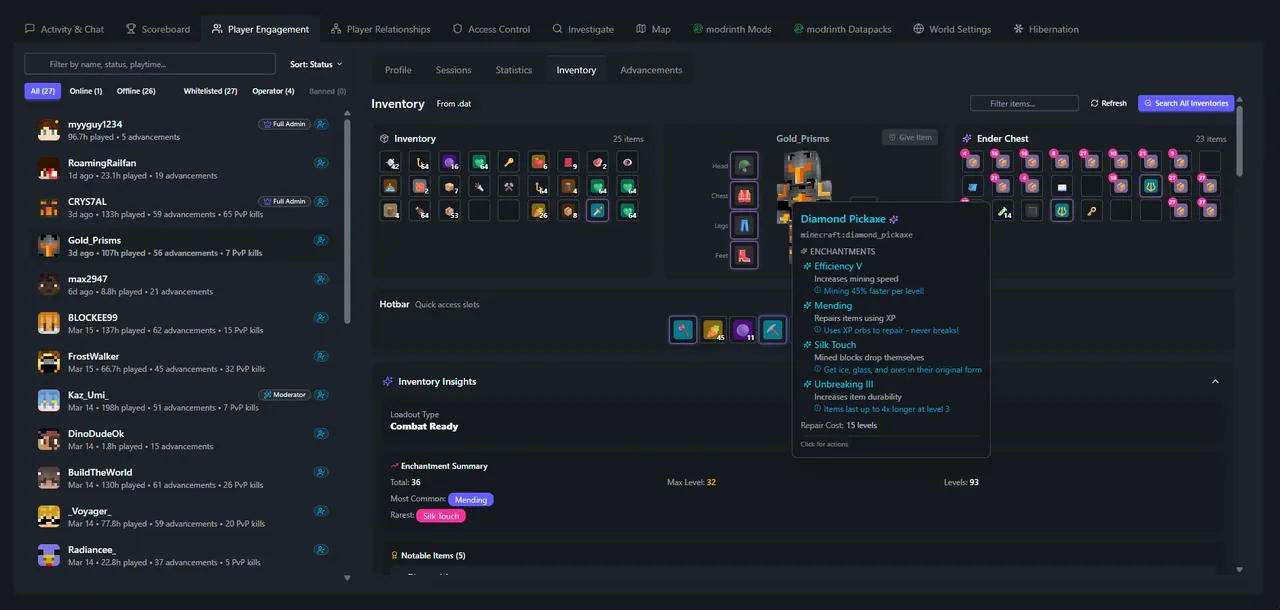
Open any player's full inventory in real time - main slots, armor, ender chest, and hotbar with an indicator showing what they're holding. A 3D animated avatar displays their skin and equipment. Click any item to give copies, delete it, or send it to another player. Peek inside shulker boxes. An AI-powered insights panel scores their loadout and suggests upgrades. A forensic timeline captures snapshots at every join, death, and PvP fight - pick any two and compare exactly what changed.
- Live-updating inventory with 3D player avatar
- Give, delete, or send items to any player - no commands
- Forensic history with side-by-side snapshot compare
- Search every player's inventory across the server
Your server, your rules Pro
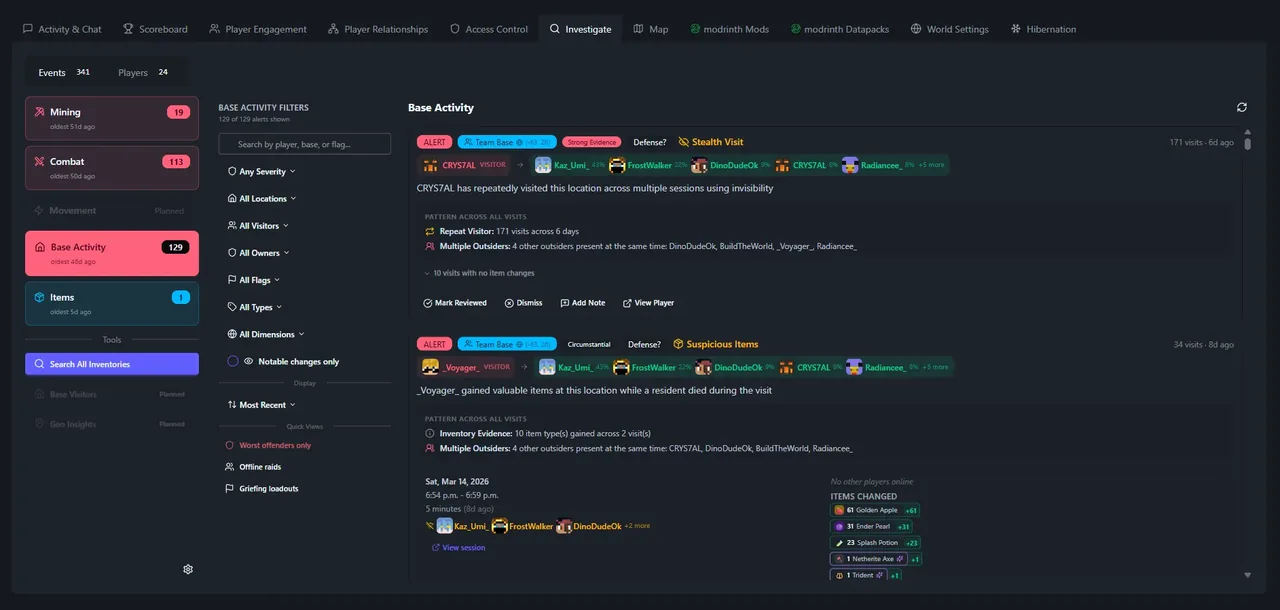
Right-click any player for instant admin actions - teleport, kick, ban, change gamemode, give items, or follow them on the map. Click anywhere on the map to send players there, set world spawn, or investigate area history. Bulk-select players for mass operations. An investigation engine runs in the background detecting x-ray mining patterns, spawn camping, suspicious base visits, and impossible movement speeds - surfacing anomalies before you even know to look.
- Teleport players to named bases, outposts & spawn
- Kick, ban, whitelist & gamemode in one click
- X-ray detection with 6-signal composite scoring
- Base visit tracking with grief protection alerts
Compared to your other options
The three paths most people consider when they want a Minecraft server for their friends - and how SpawnBox stacks up.
Much of what sets SpawnBox apart below is only possible because we went all-in on Minecraft, not a dozen games.
| Feature | SpawnBox Runs on your PC Free unless a plan is marked | Doing it yourself Download a JAR, configure manually | Realms Mojang hosted | Paid hosting Apex, Shockbyte, etc. |
|---|---|---|---|---|
| What it costs, and how much you get | ||||
| Monthly cost | Free$5 on Plus$9 on Pro | None | Paid subscription | Paid, varies by host |
| Initial app setup (one-time) | ~10 min | Hours to days | ~10 min | ~15 min |
| Creating a new server | ~5 min | ~15 min | Switch worlds | ~5 min |
| Servers running at once | 13 on Pro | Unlimited | 1 | 1 per plan |
| Can you actually run it? | ||||
| Host and play on the same PC | Technical | |||
| Works without networking knowledge | ||||
| Easy server address for friends | We pick one for youChoose your own, and keep it on Plus | Included | Included | |
| Your world stays on your PC | ||||
| Adding mods and plugins without breaking things | ||||
| One-click mod marketplace | ||||
| Pick mods first, auto-picks compatible version | ||||
| Switch server type without losing progress | Manual | |||
| Runs when you are not there | ||||
| Auto-restart on crash | Plus | Some | ||
| Starts itself when your PC boots | Plus | Manual | N/A | N/A |
| Restarts itself when nobody is playing | Plus | |||
| Survives Windows Updates | Plus | N/A | N/A | |
| Scheduled backups | DailyEvery 15 min on Pro | Manual | Basic | Some |
| See what is happening in your world | ||||
| Scoreboard & play-style rankings | Plus | Manual | ||
| Watch every player live (2 dozen+ live stats) | ||||
| Animated 3D player models | Plus | |||
| Live world map | Pro | |||
| Player profiles & session history | 7 daysUnlimited on Pro | |||
| Keep it safe, and share it | ||||
| Public web page anyone can visit | Plus | Manual | ||
| See and manage any player's inventory, live | Pro | |||
| Catch cheating & griefing automatically | Pro | |||
| Discord integration | Pro | |||
SpawnBox by the numbers
Got a question?
Ask in our Discord. It is where the community hangs out, and where you will find the person who builds SpawnBox. If you would rather not, email us.
What to expect, and your data
SpawnBox is local-first and still actively improving. Here's the honest version of what that means for your worlds and your privacy.
Your worlds are safe
Your Minecraft worlds and servers live on your own PC in the standard Minecraft format - we never touch your game files. SpawnBox's own data (analytics, session history, settings) lives in a local database, and backups are built in - we recommend keeping them on.
Telemetry & diagnostics
We collect a small amount of anonymous usage data to understand what works and catch issues quickly. Here's exactly what that includes:
We collect
- Which features you use and how often
- Session duration and navigation patterns
- Error reports and crash diagnostics
- Performance baselines (load times, TPS)
- Connection ISP and country (your full IP is never stored)
We never collect
- Chat messages or personal conversations
- World file contents or builds
- Player IP addresses or location data
Anonymous usage data is enabled by default so we can monitor quality and catch issues quickly. You can disable it in Settings at any time. Cross-device identity (an anonymous code, never your actual account info) is optional and can be toggled separately. All data is anonymous regardless. There's also a voluntary "Send Diagnostic Package" option for troubleshooting. One clarification: chat messages ARE captured locally on your PC as part of the activity log so you can search them as an admin - but they're never sent to us. Full details in our Privacy Policy.
Ready to host your own server?
Download SpawnBox and have your first Minecraft server running in minutes. Free - a real server, not a trial. No port forwarding, no monthly bill to get going.
Every new account starts with a 7-day Pro trial, so you can try all of it first.